Finding a forgotten login or resetting a lost password is a simple and automated process. You will notice on the State Net product login page there is a link that says "Forgot your ID or password" that is located on the bottom left of the page:
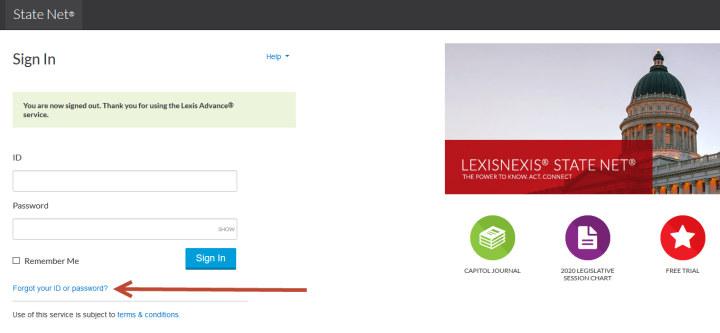
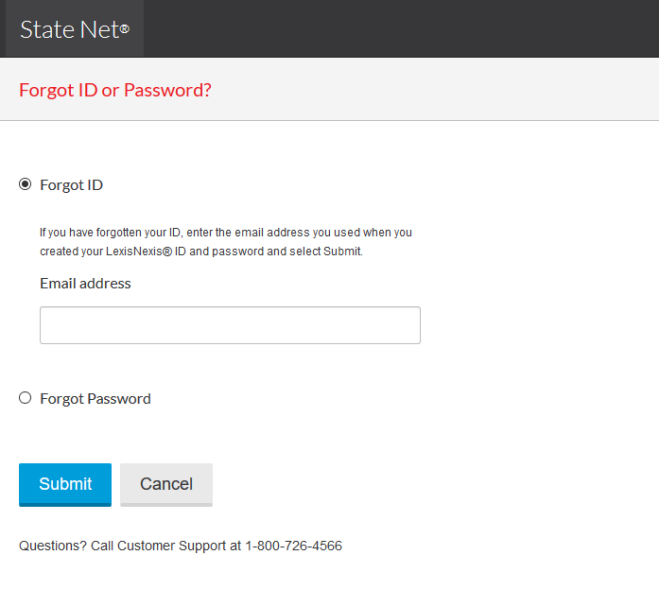
Once you click on this link you will be redirected to a page that will ask you if you are trying to find your ID or reset your password.
If you forgot your user ID, it will utilize the email address you used during your login setup to identify you and resend the ID.
If you forgot your password, it will ask you for your user ID and then will use your security questions to verify you and then it will allow you to reset your password.
Simply choose what which one you need and enter your email address and the system will send you an email with the information that you need:
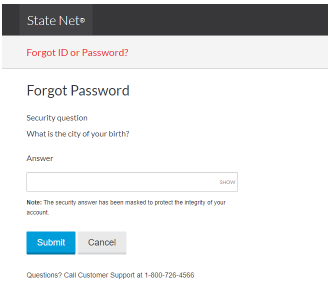
If you have forgotten your password, you will need to go through the additional step of answering the security question you established when you created your ID:
If your email has changed or if you are otherwise unable to get it reset, please simply send an email to support@statenet.lexisnexis.com or call us at 1-800-726-4566.
Comments
0 comments
Please sign in to leave a comment.